📝 Contrastive Language–Audio Pretraining (CLAP)
Description
< What is it? >
- Definition: Contrastive Language–Audio Pretraining (CLAP) learns a shared embedding space for audio recordings and natural-language descriptions. Separate audio and text encoders produce representations that can be compared for audio retrieval and zero-shot classification. See the original CLAP paper.
- Example: given a sound recording and the descriptions
Dog barking,Rain falling, andSiren wailing, the model ranks the descriptions by their similarity to the recording. - Output: CLAP produces embeddings and similarity scores. It does not itself transcribe speech, generate an explanation, or synthesize audio.
Key points
< Contrastive audio–text pretraining >
-
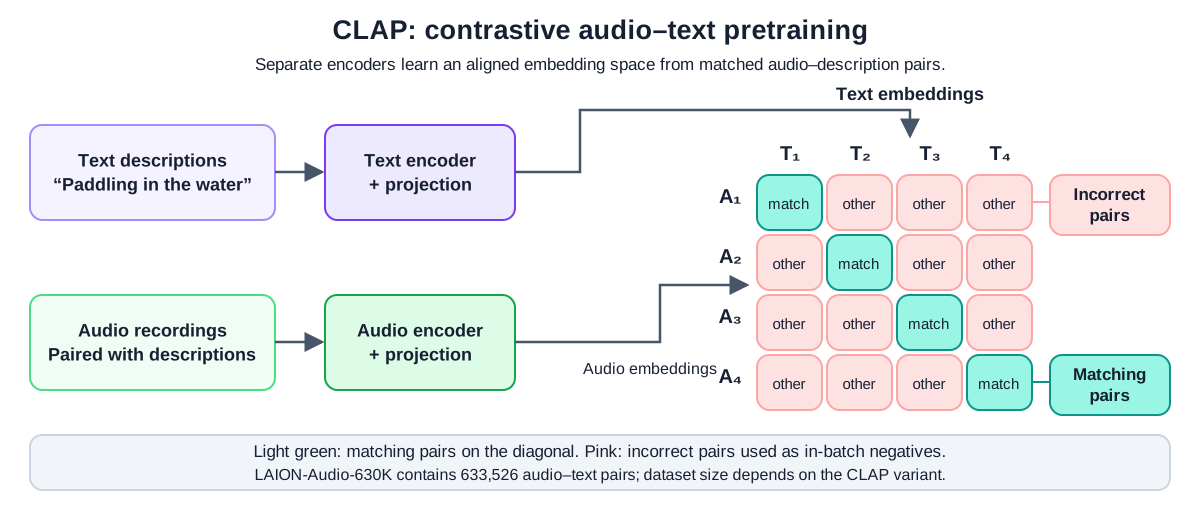
Architecture: an audio encoder and a text encoder map their inputs into aligned vectors. Contrastive training encourages paired recordings and descriptions to score above other pairings. The following diagram is redrawn from the supplied CLAP slide.
-
Training labels: the pairing identifies the matching description for each recording; it does not prescribe a target embedding vector. For a batch of aligned pairs, the model compares each audio embedding with each text embedding, producing a similarity matrix. The diagonal contains paired examples when both inputs use the same ordering. Other pairings serve as negatives, although some may describe similar sounds.
-
Learned alignment: matching output dimensions enables vector operations, while joint training makes those comparisons useful. Google's embedding-space introduction explains how learned coordinates represent relationships.
-
Dataset context: the slide's “633k pairs” refers to LAION-Audio-630K, containing 633,526 audio–text pairs. CLAP has multiple implementations and checkpoints; this dataset size is not a property of every CLAP model. See the LAION-CLAP paper.
< Zero-shot audio classification and retrieval >
- Classification: encode candidate class descriptions with the checkpoint's text encoder, encode the recording with its audio encoder, and select the highest-scoring description. The target classification task requires no additional labeled training examples. Relevant sound concepts may already have appeared in pretraining.
- Retrieval: encode an audio collection in advance. A text query such as “paddling in water” is encoded with the matching text encoder and compared with the stored audio vectors. The LAION-CLAP implementation supports audio–text embeddings and retrieval.
- Score interpretation: softmax over class logits produces candidate-relative probabilities. Their values depend on the descriptions, candidate set, and model scaling; they are not automatically calibrated probabilities that a sound event occurred.
Comparison
< CLAP vs. CLIP vs. speech recognition >
-
Choose by task: audio matching, visual matching, and transcription produce different kinds of output.
System Modalities Typical output Example CLAP Audio and text Embeddings and matching scores Match a recording to “dog barking” CLIP Images and text Embeddings and matching scores Match a photograph to “a dog” Speech recognition Speech audio → text Transcribed words Convert a spoken “Hello” into HelloCLAP can represent speech recordings, but matching a description is a different task from recovering every spoken word. See CLIP and Speech-to-Text (STT).
Implementation
< Split a video into a clip and audio >
-
Objective and source: extract the opening five seconds of a 1980s Bounce fabric-softener advertisement, then save its audio separately. This prepares corresponding visual and audio inputs for CLIP and CLAP. The example follows DataCamp: Video audio splitting.
-
Sample input: place
bounce_ad.mp4, containing both video and audio and lasting at least five seconds, in the script's working directory. The supplied GIF below is a visual preview; it does not contain the audio needed by this example.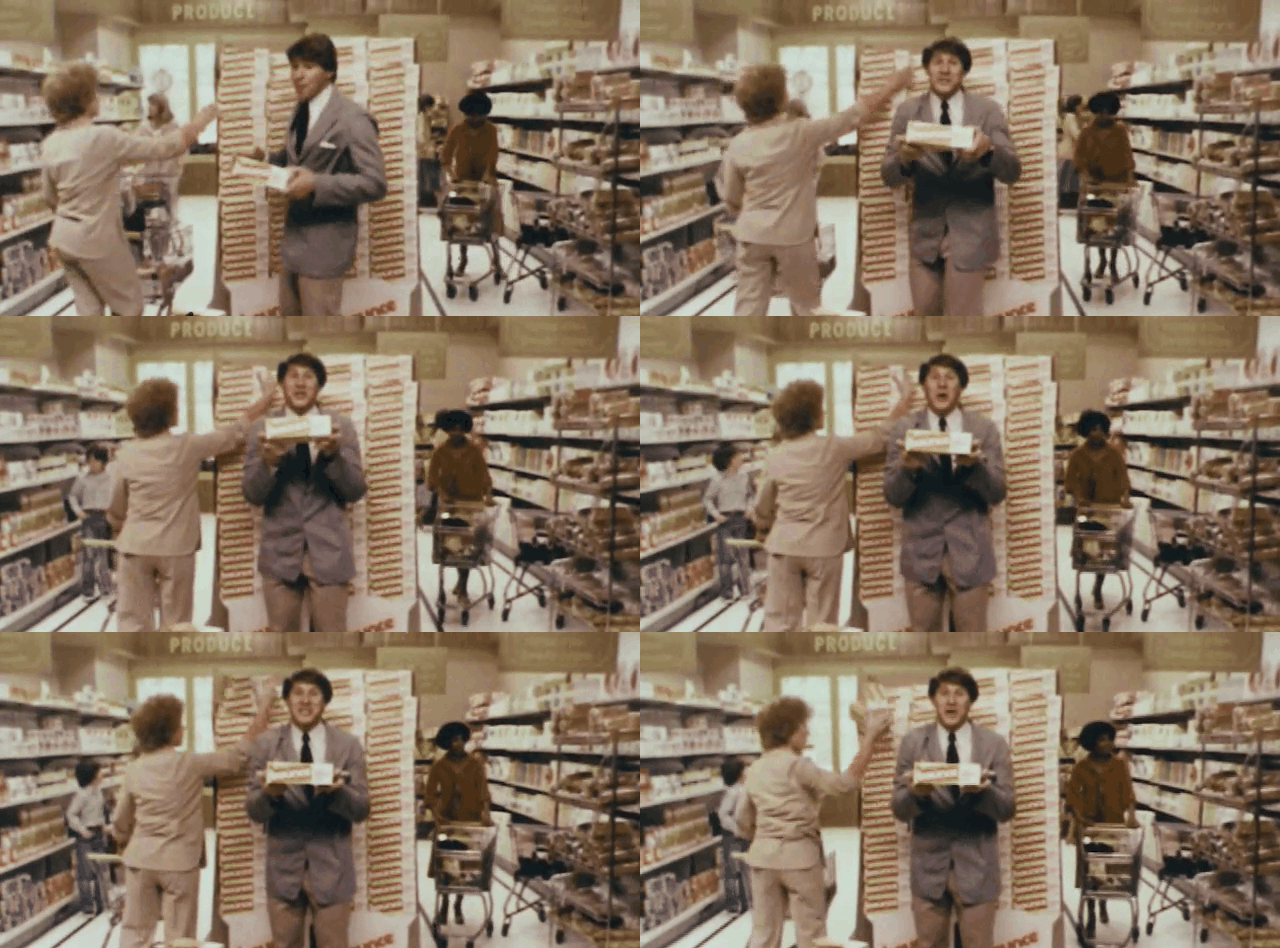
-
Extract the clip and audio: the imports below use MoviePy 2.x. The fourth argument to
ffmpeg_extract_subclip()specifies the output video filename. Loading the result with a context manager closes its readers when processing finishes.pip install "moviepy>=2,<3"from moviepy import VideoFileClipfrom moviepy.video.io.ffmpeg_tools import ffmpeg_extract_subclip# Create a subclip covering the requested interval from 0 to 5 seconds.ffmpeg_extract_subclip("bounce_ad.mp4", 0, 5, "bounce_ad_5s.mp4")# Load the new subclip and access its audio stream.with VideoFileClip("bounce_ad_5s.mp4") as video:audio = video.audioif audio is None:raise ValueError("The video has no audio stream to extract.")# Encode and save the audio as an MP3 file.audio.write_audiofile("bounce_ad_5s.mp3")print("Saved video: bounce_ad_5s.mp4")print("Saved audio: bounce_ad_5s.mp3") -
Expected output, not executed here: in addition to MoviePy's progress messages, the script prints the following and creates the two files. The source MP4 was not supplied for execution.
Saved video: bounce_ad_5s.mp4Saved audio: bounce_ad_5s.mp3File Contents Next use bounce_ad_5s.mp4Video and audio from the requested opening interval Sample frames for CLIP bounce_ad_5s.mp3Separately encoded audio from that subclip Decode and preprocess the waveform for CLAP -
Processing boundary:
video.audioreturns an audio clip object;write_audiofile()writes it to disk. This step does not extract individual frames, generate embeddings, or classify the advertisement. The audio must still be prepared at the CLAP checkpoint's required sampling rate. Stream-copy trimming and audio encoding can affect exact boundary timing; verify alignment when precise timestamps matter. See the MoviePy documentation for subclip extraction and VideoFileClip.
< Combine class scores from CLAP and CLIP >
-
Concrete inputs: this small example combines illustrative probability vectors for the same three labels in the same order. It demonstrates score fusion only; the values are supplied manually and are not measured model predictions.
classes = ["Dog barking", "Rain falling", "Siren wailing"]clap_probs = [0.80, 0.15, 0.05] # Audio branch.clip_probs = [0.65, 0.10, 0.25] # Image branch.audio_weight = 0.5combined = [audio_weight * audio + (1 - audio_weight) * visualfor audio, visual in zip(clap_probs, clip_probs)]best_index = max(range(len(classes)), key=lambda i: combined[i])print("Combined scores:", [round(score, 3) for score in combined])print("Predicted class:", classes[best_index]) -
Verified output:
Combined scores: [0.725, 0.125, 0.15]Predicted class: Dog barking -
Practical use: obtain each branch's scores using its own model and processor, with matching class order. Evaluate the fusion weights and score calibration on representative data; equal weighting is a baseline, not a guarantee of improvement. The LAION CLAP model card provides a pretrained audio-classification example.
< Video sentiment analysis with CLIP and CLAP >
-
Objective and source: estimate the emotional tone of the Bounce advertisement by combining visual scores from CLIP with audio scores from CLAP. Averaging predictions after each model has processed its input is late fusion. This continues the video and audio splitting example and follows DataCamp: Video sentiment analysis with CLIP CLAP.
-
Concrete inputs: use
bounce_ad_5s.mp4andbounce_ad_5s.mp3from the preceding exercise. Here,videois a list of sampled PIL images, not a MoviePy clip object, andaudio_sampleis a mono waveform at the audio classifier's required sampling rate. The four emotion labels below are an example list; in the exercise, retain the suppliedemotionslist.pip install torch transformers pillow librosa "moviepy>=2,<3"import librosafrom PIL import Imagefrom moviepy import VideoFileClipfrom transformers import pipeline# Create the two zero-shot classifiers.audio_classifier = pipeline(model="laion/clap-htsat-unfused",task="zero-shot-audio-classification",)image_classifier = pipeline(model="openai/clip-vit-base-patch32",task="zero-shot-image-classification",)emotions = ["happy", "sad", "angry", "neutral"]# Prepare one image per second from the saved video subclip.with VideoFileClip("bounce_ad_5s.mp4") as clip:video = [Image.fromarray(frame)for frame in clip.iter_frames(fps=1, dtype="uint8")]if not video:raise ValueError("The video contains no frames to classify.")# Decode, mix to mono, and resample to the CLAP checkpoint's rate.audio_sample, _ = librosa.load("bounce_ad_5s.mp3",sr=audio_classifier.feature_extractor.sampling_rate,mono=True,)# Create emotion scores for each sampled video frame.predictions = image_classifier(video, candidate_labels=emotions)scores = [{item["label"]: item["score"] for item in prediction}for prediction in predictions]avg_image_scores = {emotion: sum(s[emotion] for s in scores) / len(scores)for emotion in emotions}# Create scores for the corresponding audio interval.audio_predictions = audio_classifier(audio_sample, candidate_labels=emotions)audio_scores = {item["label"]: item["score"] for item in audio_predictions}# Late fusion: assign equal weight to the visual and audio branches.multimodal_scores = {emotion: (avg_image_scores[emotion] + audio_scores[emotion]) / 2for emotion in emotions}print("Multimodal scores:", {emotion: round(score, 3) for emotion, score in multimodal_scores.items()}) -
How the averaging works: first average each emotion's score across the sampled frames. Then average that visual score with the audio score for the same label. Dictionaries align results by label because pipelines may return labels in different score orders. These two averages give the entire visual branch 50% of the final weight, regardless of how many frames were sampled.
-
Illustrative scores, not measured predictions: the following numbers demonstrate the calculation. The arithmetic was verified, but the model pipelines were not executed on the advertisement.
Emotion Mean image score Audio score Combined score happy 0.60 0.40 0.50 sad 0.10 0.20 0.15 angry 0.10 0.10 0.10 neutral 0.20 0.30 0.25 With these illustrative inputs, the printed result is:
Multimodal scores: {'happy': 0.5, 'sad': 0.15, 'angry': 0.1, 'neutral': 0.25} -
Interpretation: the largest combined score selects
happyin this illustration. The scores compare the supplied labels rather than measure a person's internal emotional state. This baseline averages frames independently and does not model their temporal order. Candidate wording, frame sampling, and modality weighting should be evaluated for the intended task. The Transformers pipeline documentation describes the audio and image classifiers and their configurable text templates.
Troubleshoot
< Common audio and fusion issues >
- Audio preprocessing: follow the checkpoint's requirements for sampling rate, channels, clip duration, and padding. Resample the waveform when needed rather than only changing its sampling-rate metadata.
- Embedding compatibility: CLIP and CLAP learn different embedding spaces. Use each model's own text encoder; combine corresponding class scores instead of directly comparing or averaging unrelated embeddings.
- Ambiguous evidence: a visible dog does not establish that barking is audible. Pair frames and audio from the same interval and assess whether both modalities support the target class.
- Candidate design: descriptions must reflect the intended task. A forced choice among incomplete labels may produce a high relative score even when none is appropriate.
Examples
< Multimodal zero-shot classification with CLAP and CLIP >
-
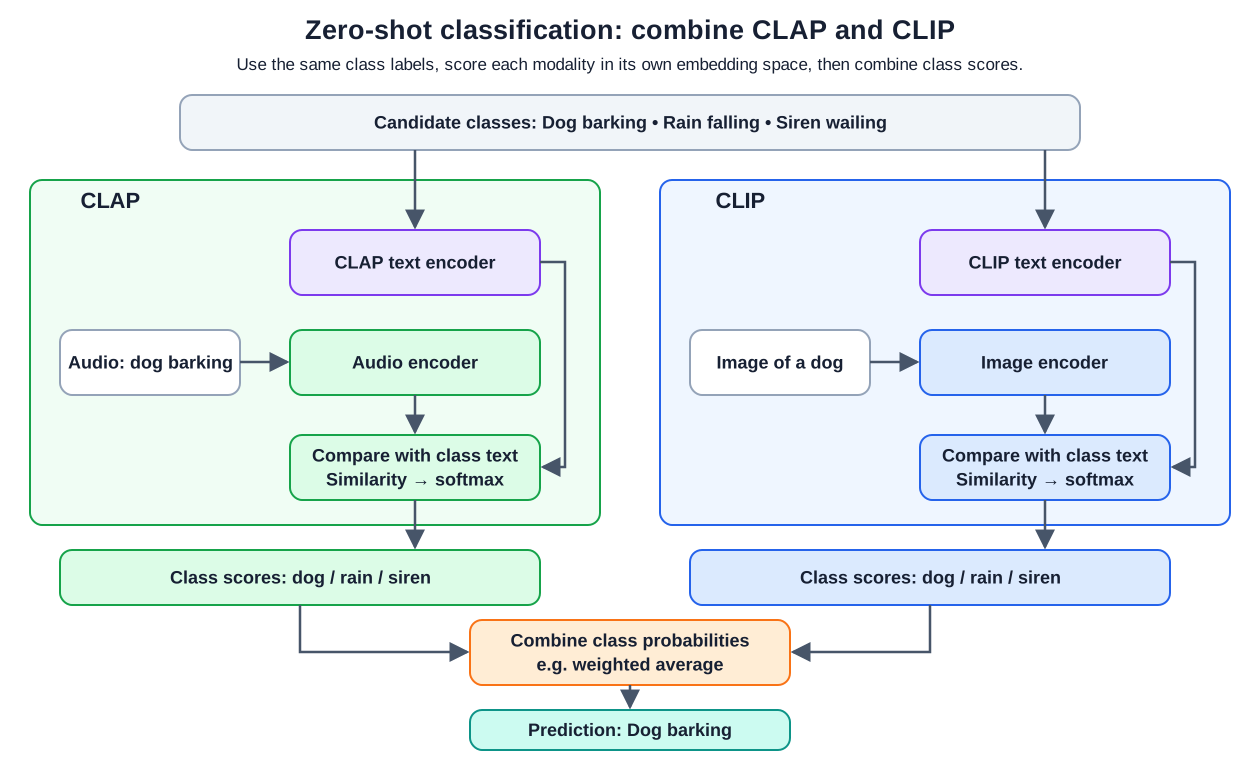
Workflow: the second supplied slide combines audio evidence from CLAP with image evidence from CLIP. Both branches use the same class meanings, but each encodes the descriptions in its own space. The diagram makes the two text encoders explicit.
-
Example: for a video interval showing a dog and containing barking, CLAP compares the audio with the candidate descriptions while CLIP compares a frame with those descriptions. Combining the aligned class-score vectors can use both sources of evidence. The implementation above demonstrates a weighted average.
-
Scope: this is an application-level combination of two pretrained models, not an intrinsic CLAP image-processing capability. The diagram's
Dog barkingresult is illustrative. See zero-shot prompting vs. classification for the distinction between prompt demonstrations and task-specific training.
Related ideas
- Multimodal Models covers cross-modal search.
- CLIP explains contrastive image–text learning.
- Speech & Audio introduces audio tasks.
- Speech-to-Text (STT) covers transcription.
- Embeddings explains vector representations and similarity.
Reference
- CLAP: Learning Audio Concepts From Natural Language Supervision
- Large-scale Contrastive Language-Audio Pretraining with Feature Fusion and Keyword-to-Caption Augmentation
- LAION-CLAP implementation
- LAION CLAP model card
- Google Machine Learning Crash Course: Embedding space
- DataCamp: Video audio splitting
- MoviePy: ffmpeg_extract_subclip
- MoviePy: VideoFileClip
- DataCamp: Video sentiment analysis with CLIP CLAP
- Hugging Face Transformers: Pipelines