📝 Visual Question Answering (VQA)
Description
< What is it? >
-
Definition: Visual Question Answering (VQA) is a multimodal task in which a model answers a natural-language question about an image. The answer depends on both visual evidence and the meaning of the question. VQA names a task; a Vision Language Model (VLM) is a model that can perform it. See the VQA project.
-
Input and output: an image and a question form the input; the output is an answer expressed in language.
Image + Question → Multimodal model → Answer -
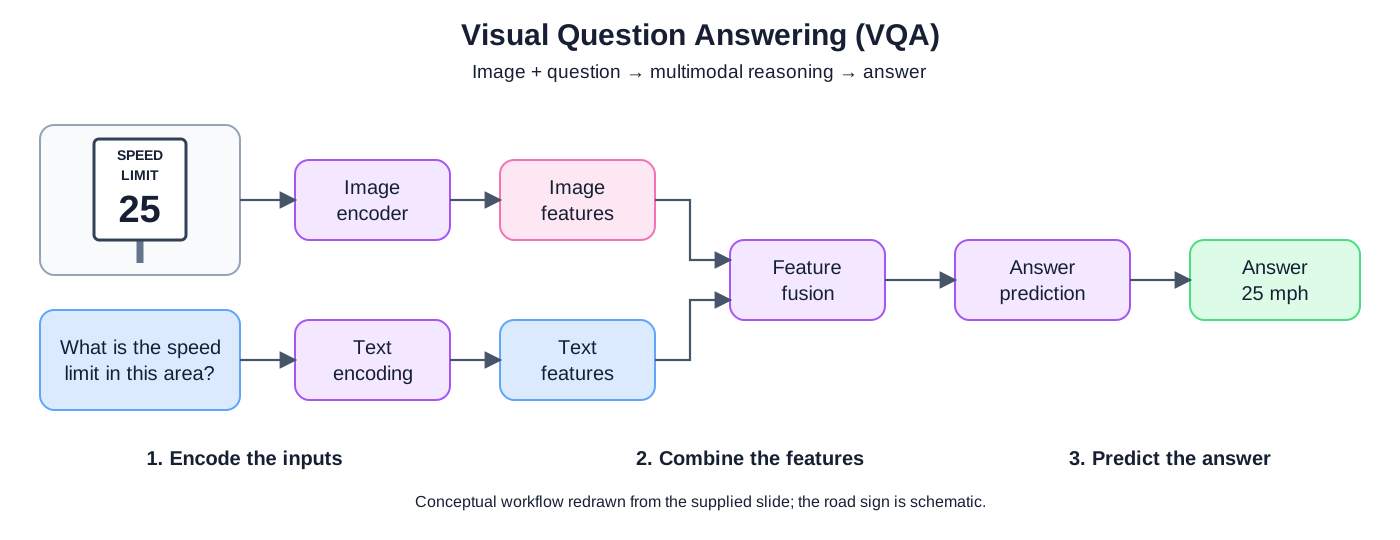
Example: given an image of a speed-limit sign displaying “25” and the question “What is the speed limit in this area?”, the expected answer in the supplied slide is “25 mph.” The model must identify the relevant sign and connect its content to the question.
Key points
< From image and question to answer >
-
Workflow: the supplied slide illustrates three stages: encode the inputs, combine their features, and predict the answer.
-
Encode the inputs: visual processing converts the image into numerical features; text processing converts the question into token representations. These representations are learned features rather than human-readable descriptions. Training can adapt representations to a task, as explained in Google's Machine Learning Crash Course: Obtaining embeddings.
-
Combine the features: the model relates the question to relevant image information. The slide's “+” denotes feature combination, not necessarily elementwise addition. Attention or another learned fusion mechanism can perform this interaction.
-
Predict the answer: a classification head can select an answer from a fixed vocabulary, or a generative decoder can produce answer tokens. The Hugging Face VQA guide illustrates both approaches.
-
Architecture scope: the diagram is a conceptual design. A generative VLM may feed visual tokens and question embeddings into a language model rather than use a separate text encoder and fusion module with these exact boundaries.
< Reusing a model trained for VQA >
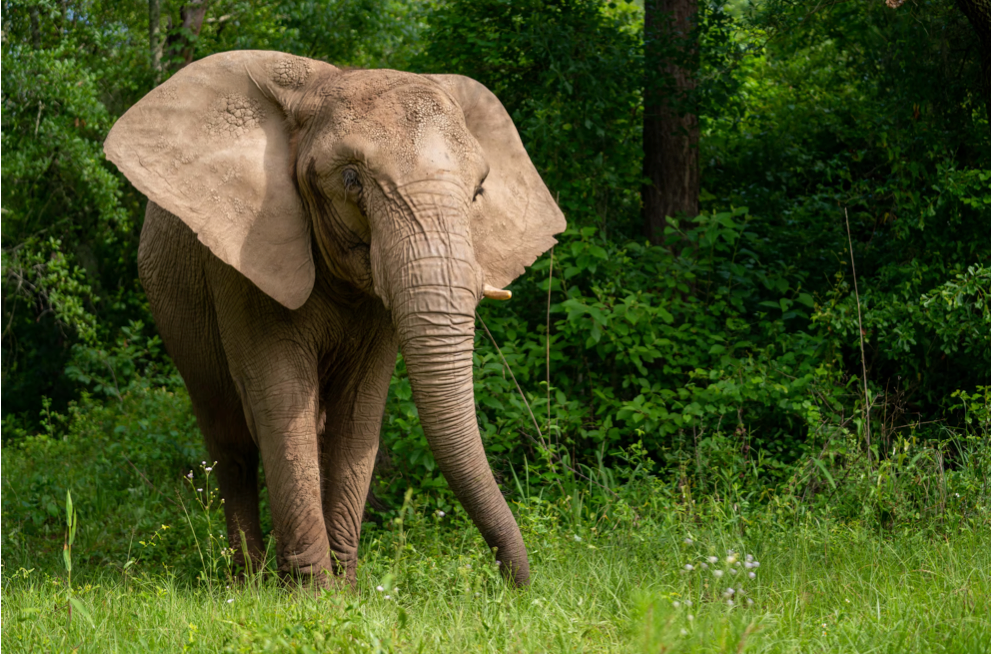
- Learned visual and language representations: training allows a model to associate image patterns with concepts expressed in text. For example, an elephant photograph and the question “What animal is in this photo?” can lead to the answer “elephant.” The question determines which information is relevant to the answer.
- Inference without additional fine-tuning: an existing checkpoint can answer new image–question pairs using its learned parameters. The
dandelin/vilt-b32-finetuned-vqacheckpoint is a Vision-and-Language Transformer (ViLT) already fine-tuned on VQAv2. Loading it and answering a question requires no further parameter updates; its accuracy on a new domain still needs evaluation. See the ViLT model card. - Connection to the workflow: ViLT processes image-patch and text embeddings jointly in a Transformer, then uses an answer-classification head. The preceding diagram describes the conceptual stages; it does not prescribe ViLT's exact internal module structure. See the ViLT documentation.
< Document Visual Question Answering (Document VQA) >
-
Definition: Document VQA applies visual question answering to document images, such as scanned reports, invoices, forms, and pages containing tables or charts. Answering a question may require reading text, locating a field, or relating a value to its heading, row, or column.
-
Text and layout: Optical Character Recognition (OCR) extracts text from pixels. Word positions preserve document layout, helping a model distinguish labels and nearby values. OCR-based document QA combines the recognized words, their locations, and the question to identify an answer.
Document image → OCR → Words + bounding boxes ─┐├→ Layout-aware QA model → Answer spanQuestion ─────────────────────────────────────┘ -
LayoutLM example: the
impira/layoutlm-document-qacheckpoint used in the slides was fine-tuned on SQuAD2.0 and DocVQA. Its pipeline extracts an answer span from document text using the question and layout information. The model card provides the checkpoint and usage details. -
Scope: document QA is broader than OCR: OCR recognizes words, while QA selects information relevant to a question. OCR-based extraction can answer questions using printed chart labels, but reading those labels does not establish an ability to infer arbitrary values from plotted geometry. Other document VQA architectures can generate answers directly from visual inputs without a separate OCR engine.
< Questions and visual evidence >
- Question types: VQA includes questions about objects, attributes, counts, spatial relationships, and visible text. The required capabilities depend on the image and question.
- Evidence quality: small text, occlusion, or insufficient resolution can make an answer uncertain. A useful answer should reflect what the supplied image supports; fluent wording alone does not demonstrate correctness.
Comparison
< VQA, image captioning, and image classification >
-
Task differences: the same image can support different outputs depending on the task.
Task Input Illustrative output for the dress image VQA Image + “What pattern is on the dress?” “A floral pattern.” Image captioning Image + an instruction to describe it “A person wearing a black floral dress.” Image classification Image + a set of candidate categories dress -
Model distinction: standard CLIP scores image–text compatibility and can select among candidate descriptions. It does not generate free-form answers. A generative VLM, such as Qwen-VL, can produce an answer conditioned on an image and question; the VLM page's Qwen example demonstrates this input-and-generation workflow.
< Photograph VQA and document VQA >
-
Different evidence sources: both tasks take an image and a question, but their typical evidence differs.
Aspect Photograph VQA Document VQA Typical input A photograph of objects or a scene A scanned page, invoice, report, or form Relevant evidence Appearance, objects, counts, and spatial relationships Written text, field labels, layout, tables, and charts Example question “What animal is in this photo?” “What was the gross income in 2011–2012?” Example approach on this page ViLT selects an answer class LayoutLM selects a span from OCR text
Implementation
< Answering a question about an elephant with ViLT >
-
Objective and source: identify the animal in a photograph using the question “What animal is in this photo?” This combines the image-loading and inference code from pages 2–4 of the supplied DataCamp VQA slides from Multi-Modal Models with Hugging Face. The example performs inference with a model already trained for VQA.
-
Sample input: the photograph below is extracted from page 2 of the PDF. The code uses the original World Animal Protection image URL shown in the slide.
-
Dependencies: the example uses the Transformers 4.x class names shown in the slides and documented in the versioned ViLT API.
pip install "transformers==4.57.1" torch pillow requests -
Load the image, prepare both inputs, and predict an answer: the processor prepares image pixels and question tokens together.
model.eval()selects evaluation behavior, andtorch.inference_mode()disables gradient tracking.from io import BytesIOimport requestsimport torchfrom PIL import Imagefrom transformers import ViltProcessor, ViltForQuestionAnswering# Concrete input: the elephant photograph used in the slides.url = ("https://www.worldanimalprotection.org/""cdn-cgi/image/width=1920,format=auto/""globalassets/images/elephants/1033551-elephant.jpg")response = requests.get(url, timeout=30)response.raise_for_status()image = Image.open(BytesIO(response.content)).convert("RGB")text = "What animal is in this photo?"checkpoint = "dandelin/vilt-b32-finetuned-vqa"processor = ViltProcessor.from_pretrained(checkpoint)model = ViltForQuestionAnswering.from_pretrained(checkpoint)model.eval()# Prepare a batch containing one image–question pair.encoding = processor(image, text, return_tensors="pt")with torch.inference_mode():outputs = model(**encoding)# Select the highest-scoring answer class and look up its text label.idx = outputs.logits.argmax(-1).item()answer = model.config.id2label[idx]print("Predicted answer:", answer) -
Output reported in the PDF: the slide shows the following result. The full model inference has not been rerun here.
Predicted answer: elephant -
How the result is obtained: each logit scores one answer in the checkpoint's fixed answer vocabulary.
argmax(-1)selects the highest-scoring class for the image–question pair;.item()extracts its integer ID;id2labelmaps that ID to the answer text. This example selects an answer class rather than generating a sequence withmodel.generate().Stage Input Output Processor Elephant image + question string Image tensors, token IDs, and masks Model Prepared tensors for one pair Answer logits with shape (1, number_of_answers)Answer selection Highest-scoring answer ID elephant, as reported in the slides
< Answering a financial-document question with LayoutLM >
-
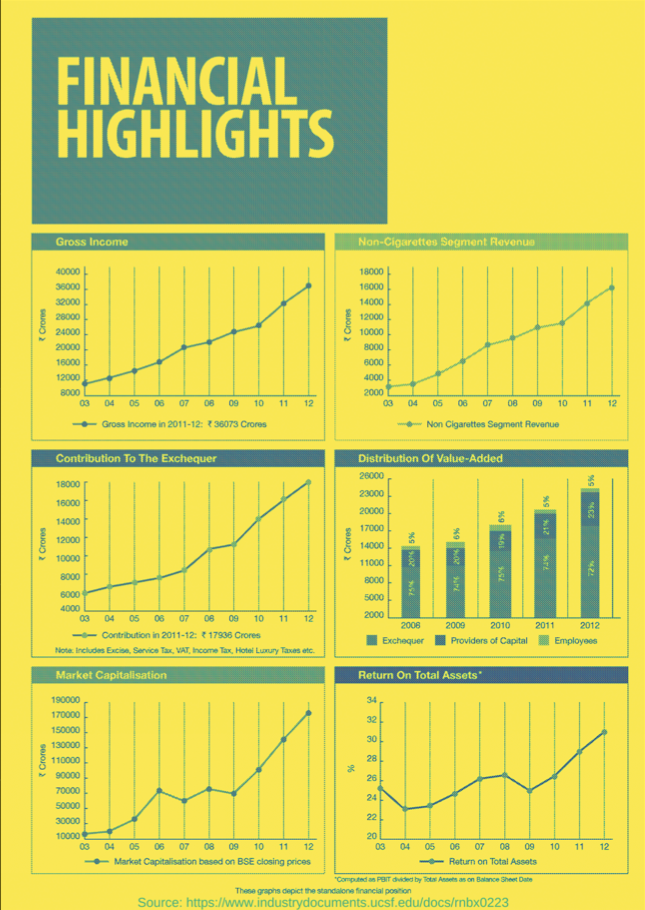
Objective and source: the supplied DataCamp Document VQA slides use a financial-highlights page from DocVQA and ask: “What was the gross income in 2011–2012?” The example uses an existing checkpoint for inference; it does not train LayoutLM.
-
Sample document: the preview below is extracted from page 1 of the PDF. Use the original dataset image for inference, preserving its text resolution.
-
Install the OCR dependencies:
pytesseractis the Python wrapper; the Tesseract OCR engine must also be installed separately and available onPATH. The example uses Transformers 4.57.1, consistent with the preceding ViLT example. See the Tesseract installation guide.pip install "transformers==4.57.1" torch datasets pillow matplotlib pytesseract# macOS with Homebrew:brew install tesseract# On Ubuntu/Debian, use this instead of the Homebrew command:# sudo apt install tesseract-ocr -
Load the document and ask the question: the slides use
lmms-lab/DocVQA; that dataset URL now redirects tolmms-lab-encoder/DocVQA. The code specifies theDocVQAconfiguration and retains the slides' third test record. Inspect the displayed page if a future dataset revision changes record ordering.import matplotlib.pyplot as pltfrom datasets import load_datasetfrom transformers import pipelinedataset = load_dataset("lmms-lab-encoder/DocVQA", "DocVQA")image = dataset["test"][2]["image"].convert("RGB")question = "What was the gross income in 2011-2012?"# Inspect the original document before interpreting the prediction.plt.figure(figsize=(7, 10))plt.imshow(image)plt.axis("off")plt.show()pipe = pipeline("document-question-answering",model="impira/layoutlm-document-qa",device=-1, # Run on the CPU.)# The pipeline runs OCR when no word boxes are supplied.result = pipe(image=image, question=question, top_k=1)# Display the fields shown in the slides; other span metadata is omitted.print([{"score": item["score"], "answer": item["answer"]} for item in result]) -
Output reported in the PDF: the slide reports the following answer and score. The model has not been rerun here; OCR and library versions can affect the result.
[{'score': 0.05149758607149124, 'answer': '3 36073 Crores'}] -
Read the answer against the source: the highlighted document label states ₹36,073 crores. The leading
3in the reported answer appears to be an OCR misreading of₹; it should not be silently treated as part of the amount. The pipeline's score ranks a candidate answer span and should not be interpreted as a calibrated probability that the financial value is correct.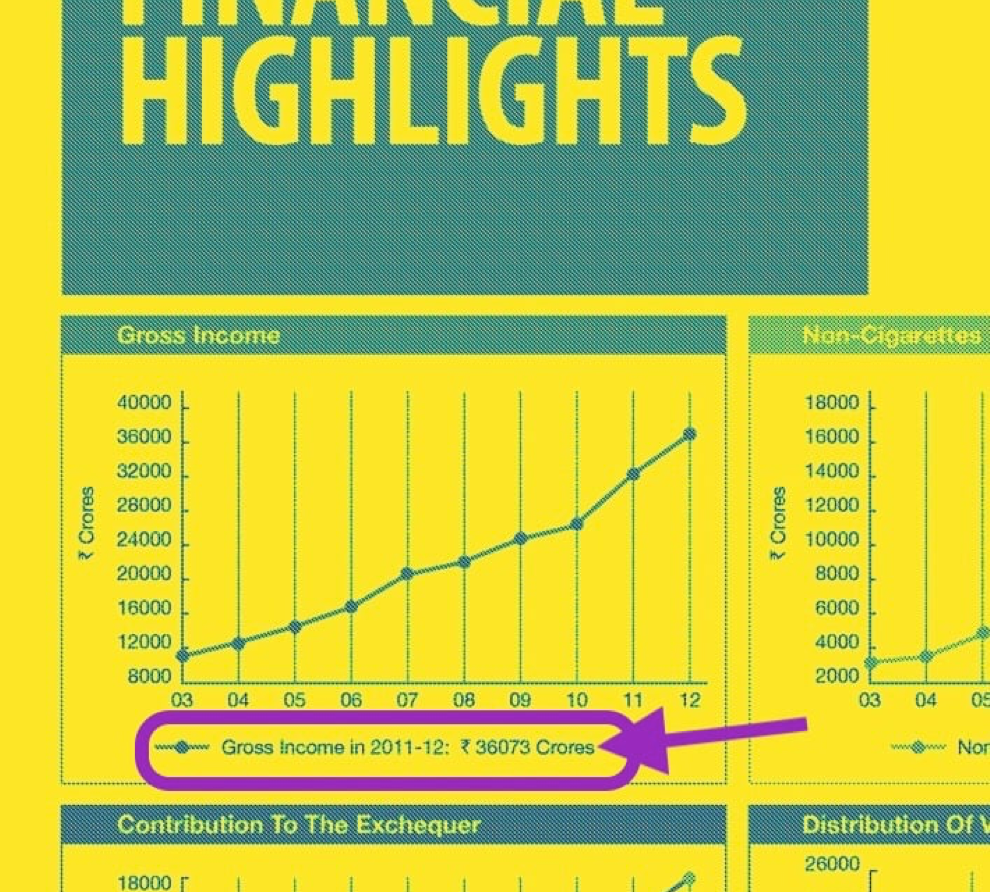
-
How the stages connect: this example extracts the printed amount beneath the chart rather than calculating it from the plotted line. The document QA pipeline API describes image inputs, optional OCR word boxes, and returned answers.
Stage Input Output OCR Financial-document image Recognized words and their bounding boxes Document QA Question + recognized text and layout Candidate answer spans with scores Source verification Reported answer + visible document label Confirm the amount, currency, and unit against the image
Troubleshoot
< Running the ViLT example >
- Image download fails: check the HTTP status and whether the source URL still serves an image. A local copy can be loaded with
Image.open("elephant.jpg").convert("RGB")instead of the download block. - Class import differs between versions: use the pinned Transformers version for this example, or consult the API documentation matching the installed version.
- Answer is incorrect or too limited: check image quality and question wording. This checkpoint selects from a fixed answer vocabulary; a generative VLM is more suitable when the application requires free-form explanations.
< Running the document VQA example >
- Tesseract executable is missing: installing
pytesseractalone is insufficient. Install the OCR engine and checktesseract --versionin the same environment that runs Python. - Numbers or currency symbols are misread: inspect the original image and OCR text before relying on the extracted answer. Preserve resolution and check the language data used by OCR.
- The answer is absent or requires calculation: an extractive model selects document text; it cannot produce a missing value or perform arbitrary arithmetic by selecting a span. Use an appropriate reasoning or calculation step when the question requires one.
Examples
< Asking different questions about one product image >
-
Sample input: use the photograph of a person wearing a black floral dress from the CLIP page. Each question directs attention to a different property of the same image.
Question Illustrative answer What is the person wearing? A dress What pattern is on the dress? A floral pattern What is the main background color? Gray -
Output interpretation: these answers describe visible properties of the supplied photograph. They are illustrative answers, not results from an executed model.
Related ideas
- Multimodal Models organizes tasks by their input and output modalities.
- Vision Language Models (VLM) explains model architectures and image–text inference.
- Contrastive Language–Image Pretraining (CLIP) covers image–text matching and zero-shot classification.
- Embeddings explains learned numerical representations.
Reference
- VQA: Visual Question Answering project
- Hugging Face Transformers: Visual question answering
- Google Machine Learning Crash Course: Obtaining embeddings
- Supplied DataCamp VQA PDF, Multi-Modal Models with Hugging Face: page 1 provides the workflow; pages 2–4 provide the elephant image, model-reuse explanation, ViLT code, and reported answer.
- Hugging Face: ViLT fine-tuned on VQAv2
- Hugging Face Transformers 4.57.1: ViLT
- World Animal Protection: elephant photograph used in the slides
- Supplied DataCamp Document VQA PDF, Multi-Modal Models with Hugging Face: document preview, OCR setup, LayoutLM example, reported answer, and highlighted source evidence.
- Hugging Face: LayoutLM document QA checkpoint
- Hugging Face: DocVQA dataset
- Hugging Face Transformers 4.57.1: Document question answering pipeline
- Tesseract OCR: Installation