📝 Skills & SKILL.md
Description
< What are Agent Skills? >
Agent Skills are reusable, filesystem-based resources that give an AI agent domain-specific expertise: workflows, context, and best practices that turn a general-purpose agent into a specialist. Each skill has a required SKILL.md file with name, description, and instructions; it may also include scripts and resources such as references, templates, and schemas.
Unlike prompts—conversation-level instructions for a particular request—a skill's full instructions load on demand. Reusable guidance therefore does not need to be repeated across conversations.
< What do they have? >
SKILL.md: metadata, instructions, guardrails, and script rules or entry points.- Scripts: runnable code, such as
pdf_parser.py,validator.py, ormigrate.py. - Resources: templates, schemas, and references.
- SKILL.md
- Skills resources
< Why use them? >
- Domain expertise: package organization- or task-specific knowledge.
- Repeatable workflows: make multi-step work more consistent and easier to verify.
- Progressive disclosure: detailed instructions consume context only when a relevant skill is selected.
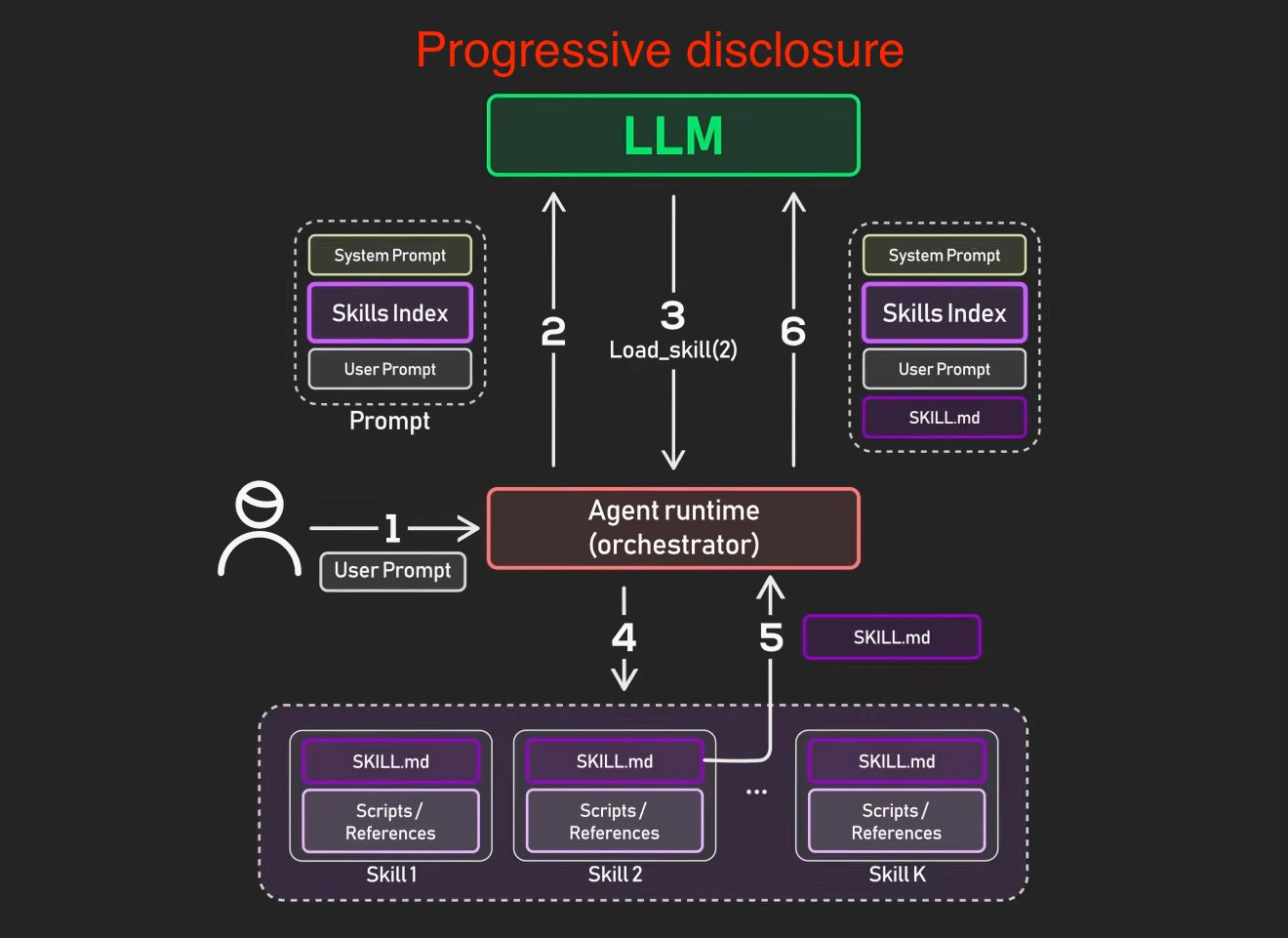
< How do they work? >
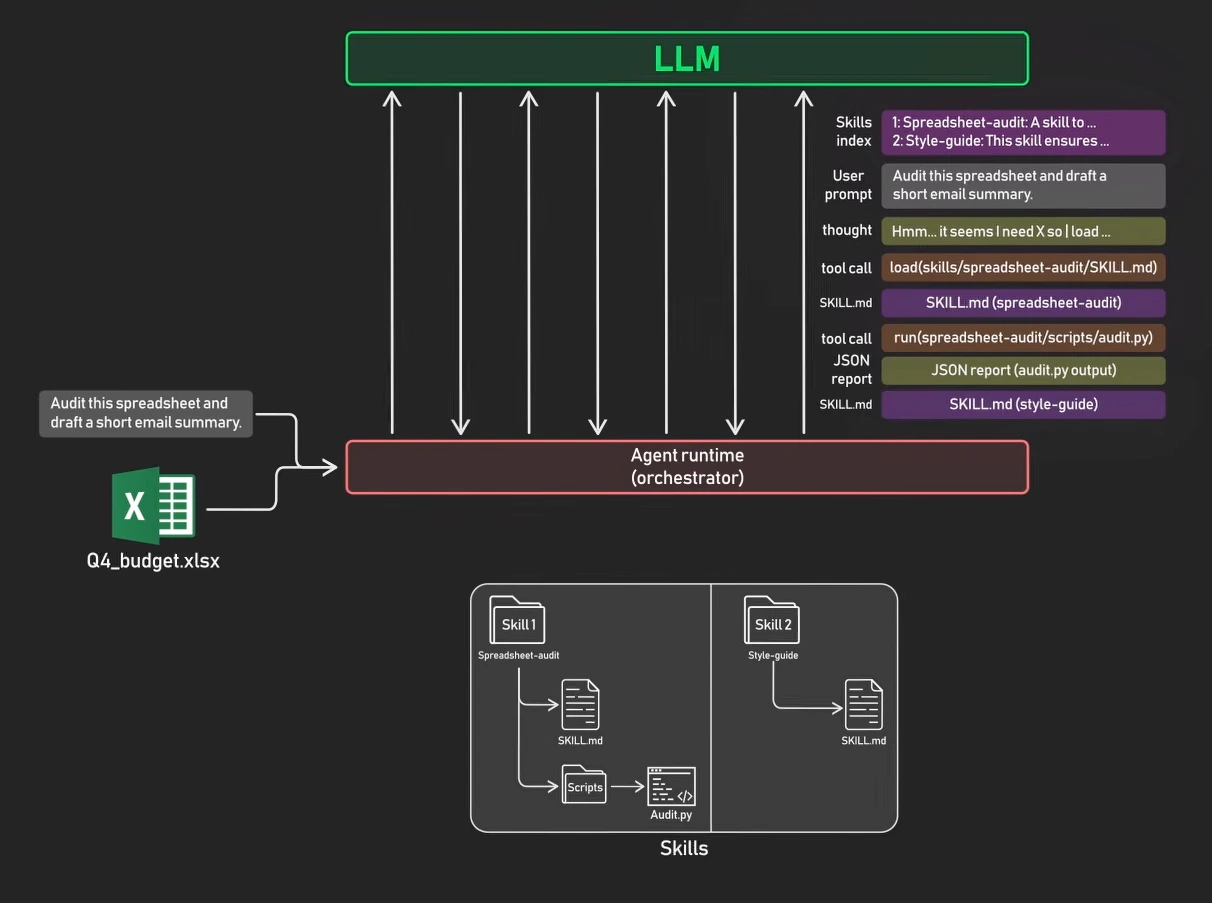
- Startup discovery: Claude Code loads only each available skill’s name and description.
- Activation: when a request matches a skill, it loads that skill’s full
SKILL.mdcontent. - Execution: the agent follows the instructions and may use bundled resources.
Key points
< When should I use a skill? >
- Use a normal prompt for one-off work.
- Create a skill for a recurring workflow, especially one that needs consistent steps, scripts, templates, or verification rules.
< Why use skills instead of one long prompt? >
An agentic Retrieval-Augmented Generation (RAG) application may make several LLM calls for one user question. For each call, the runtime constructs the context needed for that step: base instructions, the current task and state, tool results, and selected retrieved chunks. Base instructions commonly recur across calls.
If every reusable procedure is placed in that base prompt, its full text consumes context even for tasks that do not need it. Skills keep detailed, reusable workflow instructions outside the always-present prompt. Codex first sees each skill's small metadata—its name, description, and path—then reads the full SKILL.md only after selecting that skill. This lets the base prompt stay short while a selected skill can be detailed.
Split independently useful workflows into separate, focused skill directories. Use meaningful task names rather than generic skill_1 and skill_2:
.agents/skills/
├── rag-ingestion/
│   └── SKILL.md
├── rag-retrieval/
│   └── SKILL.md
├── rag-evaluation/
│   └── SKILL.md
└── documentation-style/
    └── SKILL.md
- Each
SKILL.mdis independently discoverable. A task can select one or more relevant skills; a parent folder is only an organizational grouping, not a runtime “skill set.” - Keep tightly coupled steps in one skill. Split a workflow only when its parts can be selected independently; every discovered skill still contributes metadata, and an overly large catalog can make routing less reliable.
- Put lengthy supporting material in
references/and have the selected skill point to it. Skills reduce reusable instruction context, while RAG separately reduces source-document context by retrieving only relevant chunks.
< A minimal skill structure >
sales-report/
├── SKILL.md
├── scripts/
│   └── build_report.py
├── references/
│   └── metric_definitions.md
└── assets/
    └── report_template.xlsx
SKILL.md must include name and description in its frontmatter:
---
name: sales-report
description: Create a formatted sales report from CSV or Excel data.
---

# Instructions

1. Validate the source data.
2. Calculate the required metrics.
3. Use the report template.
4. Verify formulas before delivery.
A user can then write: Use the sales-report skill to create the August report from sales.csv.
< How should a skill use scripts efficiently? >
A skill can instruct the agent to run a script instead of reading or recreating its source code. In that workflow, the script's full contents do not need to enter the conversation context; the command result is what the agent receives.
State this explicitly in SKILL.md, for example: “Run scripts/validate_environment.py; do not read the script unless it fails or needs modification.”
This is especially useful for:
- Environment validation
- Consistent data transformations
- Operations that are more reliable as tested code than generated code
< Where should SKILL.md go? >
- Project-specific:
.agents/skills/<skill-name>/SKILL.md— commit it to the repository for the team. - Personal:
$HOME/.agents/skills/<skill-name>/SKILL.md— available across your projects. - Machine-wide:
/etc/codex/skills— for shared administrative skills. - Distribute broadly: package the skill as a plugin.
Codex scans .agents/skills from the current working directory up to the repository root. The filename must be exactly uppercase: SKILL.md.
< Where does Claude Code scan for skills? >
Claude Code has four primary filesystem scopes for skills:
| Scope | Path | Availability |
|---|---|---|
| Enterprise | <managed-settings-dir>/.claude/skills/<skill-name>/SKILL.md | Users on machines where an organization deploys it |
| Personal | ~/.claude/skills/<skill-name>/SKILL.md | All of one user's local projects |
| Project | .claude/skills/<skill-name>/SKILL.md | Sessions in that repository; commit it to share with the team |
| Plugin | <plugin>/skills/<skill-name>/SKILL.md | Wherever that plugin is enabled |
For a typical repository, use .claude/skills/<skill-name>/SKILL.md. Claude Code also supports nested project skill folders, directories added with --add-dir, and skills synced from a Claude.ai account. Claude Code's skills documentation has the complete, current discovery rules.
When non-plugin skills share the same name, precedence is:
Enterprise > Personal > Project
Plugin skills are not simply last in this chain. Claude Code namespaces them as /plugin-name:skill-name, so a plugin skill can coexist with a skill of the same name from another scope.
< How can skills be shared? >
Skills become more valuable when they are shared. A pull-request review skill is useful for one developer, but sharing it with a team standardizes the review process and gives contributors a consistent experience.
- Project skills: commit
.claude/skills/to Git. Anyone who clones or pulls the repository receives the skills with the project. - Plugins: package skills in a plugin to distribute them across repositories, including through a marketplace.
- Enterprise-managed skills: deploy skills through managed settings for the entire organization. They have the highest precedence over personal and project skills with the same name, which makes them appropriate for mandatory standards and compliance requirements.
< How do subagents use skills? >
Use a custom subagent's skills frontmatter field to preload a skill's full content at subagent startup:
skills:
  - api-conventions
  - error-handling-patterns
The skills field controls preloading, not access. A custom subagent that has the Skill tool can still discover and invoke project, personal, and plugin skills during execution even when no skills are listed. Built-in subagents do not preload skills, so do not assume that a named built-in agent has a particular skill available. Claude Code's skill locations and subagent documentation describe the current behavior.
< What is CLAUDE.md? >
CLAUDE.md is Claude Code's persistent instruction file. Claude loads it at the start of every session, so it is a good place for build and test commands, coding conventions, project architecture, and rules that should always apply.
| Scope | Location | Use |
|---|---|---|
| Project | ./CLAUDE.md or ./.claude/CLAUDE.md | Team-shared instructions committed to Git |
| Personal | ~/.claude/CLAUDE.md | A user's preferences across local projects |
| Local | ./CLAUDE.local.md | Personal, project-specific notes; add it to .gitignore |
Keep CLAUDE.md concise and reserve it for universal instructions. Put lengthy, task-specific procedures in skills because a skill's full content loads only when relevant. CLAUDE.md guides Claude's behavior rather than enforcing policy; use hooks or permissions for actions that must be blocked. See Claude Code's memory documentation for its complete loading rules.
Comparison
Claude Code offers several customization options: skills, CLAUDE.md, subagents, hooks, and MCP servers. They solve different problems, and choosing the right one prevents unnecessary complexity.
< Prompt vs. skill >
A prompt describes the request at hand. A skill describes a reusable way to perform a class of requests.
Note: I think the most important thing is, skill does not need to be loaded every time, but could be done by progressive disclosure
| Aspect | Prompt | SKILL.md |
|---|---|---|
| Purpose | Describe what to do now | Describe how to perform a reusable workflow |
| Lifetime | Usually one request or conversation | Persists as a reusable capability |
| Activation | Sent directly in the request | Selected explicitly or when its description matches the task |
| Content | Task, context, constraints, and desired output | Metadata, procedures, rules, references, and tool guidance |
| Supporting files | Usually none | May include scripts, templates, examples, and assets |
| Example | “Create a sales report from this CSV” | A sales-report skill that explains how to analyze, format, and verify reports |
A SKILL.md still contains natural-language instructions. The user’s prompt supplies the concrete objective, inputs, and task-specific requirements.
Prompt: what the user wants
             ↓
Skill: reusable knowledge about how to do it
             ↓
Task-specific result
< Skill vs. MCP >
A skill packages reusable instructions and supporting files for a task. Model Context Protocol (MCP) is a standard interface through which an AI application connects to a server's tools, resources, and prompt templates. A skill can explain how to use an MCP tool as part of a workflow.
| Aspect | Skill | MCP server |
|---|---|---|
| Main role | Teach the agent how to carry out a task | Expose capabilities and context through a standard protocol |
| Typical contents | SKILL.md, scripts, references, templates | Tool implementations, resources, prompt templates |
| How it is used | The agent reads instructions and follows the workflow | The application connects to the server and requests its capabilities |
| Example | Explain how to prepare a monthly sales summary | Provide a get_sales(month) tool that reads sales records |
Skills can include executable scripts, and MCP can provide reusable prompts. The distinction is how they package and expose functionality. A skill can use local tools without MCP, and an MCP tool can be used without a skill. See the Agent Skills overview and MCP server concepts.
-
Example: a sales-summary skill using an MCP tool. The skill supplies the procedure in
sales-summary/SKILL.md:---name: sales-summarydescription: Prepare a monthly sales summary from sales records.---1. Use get_sales(month) to retrieve the requested month's records.2. Sum revenue by product and calculate the overall total.3. Return a table and a short summary of the largest contributors.The MCP server supplies the callable operation. This is Python-style pseudocode, with connection and database setup omitted:
server = MCPServer("sales")@server.tool()def get_sales(month: str):"""Return product and revenue records for a month such as 2026-09."""return database.fetch_sales(month=month)server.run()The agent follows the skill, calls
get_salesthrough the connected MCP client, then summarizes the returned records. The skill describes the workflow; the tool retrieves the data.
< Choosing the right customization >
| Feature | How it activates | Best for | Example |
|---|---|---|---|
CLAUDE.md | Loaded into every conversation | Always-on project standards, build commands, and conventions | 1. “Run npm test before committing”2. “Never commit to the main branch” 3. “Always use TypeScript strict mode in this project” |
| Skill | Loaded on demand when relevant or explicitly invoked | Task-specific expertise and reusable workflows | 1. A PR-description workflow 2. A step-by-step checklist for reviewing pull requests |
| Subagent | Spawned or delegated for a separate task | Isolated research, implementation, reviews, and parallel work | Review every API change and return a summary |
| Hook | Fires on lifecycle events, such as file changes or tool calls | Automatic validation, policy checks, and event-driven automation | Automatically run a linter every time a watched file changes |
| MCP server | Provides tools and data from an external system | Integrations with APIs, databases, issue trackers, and other services | Read an issue from GitHub or query a database |
Skills add knowledge to the current conversation; subagents run in isolated execution contexts and return results to it. Hooks are event-driven, whereas skills are request-driven. MCP servers expose tools, resources, and prompt templates through a standard interface. Combine these features when useful instead of forcing every concern into one mechanism. See Claude Code memory, skills, subagents, hooks, and MCP.
< Skills vs. subagents >
| Aspect | Skill | Subagent |
|---|---|---|
| Main purpose | Reusable knowledge or workflow | Independent worker for a task |
| Context | Full instructions load into the current agent's context when needed | Gets its own context window and system prompt |
| Execution | Guides the active agent | Works independently, then returns a summary or result |
| Best for | Checklists, style guides, repeatable procedures, and scripts | Research, code review, debugging, large searches, and parallel work |
| Tool and model control | Can grant tools for the workflow | Can have its own tools, permissions, model, hooks, and turn limit |
| Context benefit | Avoids loading long instructions until relevant | Keeps logs, exploration, and file reading out of the main conversation |
| Typical location | .claude/skills/<name>/SKILL.md | .claude/agents/<name>.md |
- Use a skill for “how should this task be done?”
- Use a subagent for “who should do this separate piece of work?”
- They can work together: a subagent can preload skills or use a skill while completing its task.
Start with a skill for recurring instructions. Introduce a subagent when the work benefits from isolated context, separate tool or model controls, or parallel execution. See Claude Code skills and Claude Code subagents.
Implementation
< Example: codebase onboarding >
---
name: codebase-onboarding
description: Helps new developers understand how this service is organized. Use when someone asks "where do I start in this repo", "explain the architecture", or "give me a tour of the codebase".
allowed-tools:
  - Read
  - Glob
  - Grep
  - Agent
  - Bash
---

# Codebase onboarding

When a new teammate asks for help getting oriented, walk them through the codebase in this order:

1. **Repo layout** — run `ls` at the repo root and explain each top-level directory in one sentence.
2. **Entry points** — point to where the service starts (`server.py`, `manage.py`, or similar) and trace the first request through the stack.
3. **Domain glossary** — surface the 5–10 nouns that show up everywhere in the code (Tenant, Workspace, Subscription, etc.) and explain what each one represents.
4. **Tests** — show the test directory layout and one example test that exercises the happy path.
5. **Local dev** — point them at the README's setup section.

Be patient. The goal is *understanding*, not speed — let them ask follow-up questions.

## Learn more

For deeper context on the layered architecture, dependency flow, and common pitfalls, see [Architecture Reference](./references/architecture.md).
< Example: pull-request description >
---
name: pr-description
description: Generate PR descriptions from git diffs showing What, Why, and Changes
---

Run `git diff main...HEAD` to see the changes in this PR, then help me write a PR description with these three sections:

**What** - Brief summary of what was changed
**Why** - The reasoning or motivation behind the changes
**Changes** - A bulleted list of the specific modifications made

Format the output as a clean, readable markdown document suitable for a pull request body.
< Example: frontend reviewer subagent >
This is a custom subagent definition, not a complete multi-agent system by itself. In a multi-agent workflow, a main agent can delegate frontend review to this specialist and combine its report with work from other agents. In a supervisor-worker design, a main agent can delegate frontend review to this specialized worker and incorporate its report into the final result.
---
name: frontend-reviewer
description: Reviews frontend code for accessibility issues and performance regressions, then returns a structured report.
tools: Bash, Glob, Grep, Read, WebFetch, WebSearch
skills: accessibility-audit, performance-check
model: sonnet
color: blue
---

# Frontend reviewer

Review frontend changes and produce a report with these sections:

1. **Accessibility findings** — WCAG 2.1 AA issues, ARIA labels, color contrast, and keyboard traps
2. **Performance findings** — render-blocking resources, oversized bundles, layout thrash, and unnecessary re-renders
3. **Suggested fixes** — concrete suggestions ordered by impact

Be specific: cite file paths and line numbers. Avoid stylistic changes; prioritize user-facing correctness and performance.
The skills field preloads the accessibility-audit and performance-check skill content into this subagent's context at startup. It does not itself grant runtime skill invocation. Because this configuration does not include the Skill tool, the subagent cannot discover or invoke additional skills during the review; add Skill to tools only if that behavior is needed. See Claude Code's subagent documentation for the current skills behavior.
Troubleshoot
< Skills bugs quick checklist >
When a skill fails, the cause usually falls into one of four categories: triggering, loading, conflicts, or runtime execution. Start with validation so structural errors do not distract from the real problem.
| Symptom | First checks | Solution |
|---|---|---|
| Before debugging | Run the reference validator | Run skills-ref validate ./my-skill to catch invalid frontmatter and naming or layout problems before investigating behavior |
| Skill is not triggering | Compare its description with how users actually phrase requests | Add distinct trigger phrases, then test realistic variations such as “help me profile this,” “why is this slow?,” and “make this faster” |
| Skill is not loading | Check the directory path, uppercase SKILL.md filename, and YAML frontmatter syntax | Put SKILL.md inside a named skill directory, not directly in the skills root; run claude --debug and look for messages mentioning the skill name |
| The wrong skill is used | Compare descriptions for overlap | Make each description more specific and distinct so the agent can route requests reliably |
| A skill is shadowed | Check for another skill with the same name in a higher-priority scope | Rename the conflicting skill, or ask the administrator about an enterprise-managed skill |
| Plugin skills are missing | Confirm that the plugin is installed and enabled | Reload or clear the plugin cache, restart Claude Code, and reinstall the plugin if needed |
| Runtime failure | Check dependencies, file permissions, and paths | Install required packages, run chmod +x on referenced scripts, and use forward slashes in cross-platform paths |
The Agent Skills specification defines the required skill-directory layout, exact SKILL.md filename, frontmatter requirements, and the reference validator. Claude Code's skills documentation explains its discovery, priority, and plugin behavior.
Video Tutorial
- What Are Agent Skills Really About?
- Intro to Agent Skills
Reference
- What Are Agent Skills Really About? (ByteByteAI | Youtube)
- Agent skills (claude)
- Extend Claude with skills (Claude Code documentation)
- How Claude remembers your project (Claude Code documentation)
- Create custom subagents (Claude Code documentation)
- Hooks reference (Claude Code documentation)
- Connect Claude Code to tools via MCP (Claude Code documentation)
- Build skills (official OpenAI documentation)
- Agent Skills specification
- Agent Skills overview
- Model Context Protocol: Server concepts
- skills-ref reference validator
- Agent skills (NVIDIA)
- Agent Skills (Microsoft)
- AI agent skills (Google)