📝 Computer Vision (CV) Fine-Tuning
Description
< What is it? >
- Definition: computer-vision fine-tuning adapts a pretrained vision model to a target dataset by updating some or all of its parameters. The pretrained model provides learned visual features, while the new training examples guide adaptation to the target task.
- Example: a classifier pretrained on ImageNet can be adapted to distinguish car models by replacing its classification head and training on labeled car photographs.
- Scope: this page follows a connected image-classification workflow: prepare the Stanford Cars dataset, adapt the output classes, configure the trainer, and train and evaluate the model. For the underlying concepts and other visual tasks, see Computer Vision (CV).
Definition
< Classification head >
-
Meaning: a classification head is the task-specific output component of a neural network that converts learned features into class scores. The backbone extracts visual features from an image; the head uses those features to distinguish the target classes. A head may contain one or several layers, often ending with a fully connected linear layer.
-
Input and output: for the three-class car model on this page, the head receives a feature vector representing the image and produces three logits, one for each car class. The feature-vector dimensions are learned numerical components, not predefined labels such as “wheel” or “door.”
Car photograph → Backbone → Feature vector → Classification head↓Three class logits↓ SoftmaxProbabilities for A, B, C -
Linear head: a simple head computes , where is the input feature vector, and are trainable weights and biases, and contains the class logits. If has components and there are classes, the linear layer maps input features to output scores.
-
Role in fine-tuning: the original MobileNet head maps visual features to 1,000 ImageNet class scores. Replacing it with a three-output head changes the prediction space to the selected car classes while retaining the pretrained backbone. The training process below learns the new head's parameters and adapts the unfrozen backbone.
Key points
< How fine-tuning adapts a pretrained model >
-
Starting point: a pretrained model already contains parameters learned from a source dataset. Its visual backbone provides representations of patterns such as edges, textures, and shapes that can support a new task.
-
Example: suppose a model was pretrained on one million labeled images, and the target task is to distinguish car models A, B, and C using a collection of 1,000 labeled car photographs. These counts are illustrative; the Stanford Cars exercises below use a different dataset size.
Step Action Purpose Load pretrained weights Reuse the existing visual backbone Start from learned visual features Adapt the output layer Replace the original classification head with three outputs Produce one score for each target car class Prepare the car dataset Separate training, validation, and test examples Learn from the training subset and assess generalization on held-out images Run training Compare predicted class scores with each image's label using a classification loss Measure prediction error Update parameters Backpropagate gradients and apply optimizer updates Adapt the trainable weights to the car-classification task -
Reuse of pretraining: the original million images do not need to be loaded again. Their influence is already represented in the pretrained weights; fine-tuning can proceed using the target dataset.
-
Which parameters change: fine-tuning can update selected backbone layers or the entire backbone together with the new head. Freezing the backbone and training only a new head is often called feature extraction or linear probing when the head is linear. In the exercises below, no layers are frozen, so training updates both the backbone and the classification head.
< Preparing images for fine-tuning >
- Inputs and labels: each classification example contains an image and a target class. Preprocessing converts the image into a tensor; the class label supplies the training target.
- Preprocessing: resize images, convert them to the expected channel format, and scale or normalize pixel values. Image size and normalization settings must match the pretrained model being fine-tuned.
- Evaluation data: split the data before training. Use validation data to select models and hyperparameters, and reserve test data for final evaluation. See Google's Machine Learning Crash Course.
< Training artifacts and prediction outputs >
-
Two stages: fine-tuning produces an adapted model, while inference applies that model to a new image.
Stage Input Output Fine-tuning Pretrained weights and labeled car images Updated model weights, model configuration, and class mappings; save the image processor for consistent preprocessing Inference A new car photograph, processed with the model's image processor One logit per car class, convertible into probabilities and a predicted class -
Interpreting scores: softmax converts a single-label classifier's logits into probabilities that sum to one. The class with the highest probability is selected as the prediction. See Google's multiclass classification guide.
-
Task boundary: this classifier selects among its configured classes. It does not produce bounding boxes or automatically identify an unknown class. Locating cars within a scene requires an object-detection model and suitable training annotations.
Comparison
< Classifier outputs before and after fine-tuning >
-
Changing the target classes: the MobileNet checkpoint used below originally classifies images into 1,000 ImageNet categories. The adapted model distinguishes three selected Stanford Cars classes. Both models receive images and produce class scores, but the number and meaning of those scores change.
Aspect Before fine-tuning After fine-tuning Task Classify among 1,000 ImageNet categories Distinguish three selected car models Input An image processed with the checkpoint's image processor An image processed with the saved image processor Classification head 1,000 output neurons 3 output neurons Raw output per image 1,000 logits, one per ImageNet class 3 logits, one per car class Batch output shape (B, 1000)(B, 3), whereBis the batch sizeAfter softmax Probabilities across the 1,000 original classes Probabilities across the three target classes Predicted label An ImageNet category, such as sports carA car-model name from the selected dataset labels -
Example: the same car photograph could receive the following predictions. The probabilities are illustrative, not results from an executed model; A, B, and C stand for the three selected car-model names.
Same car photograph│├── Original pretrained classifier → Softmax│ sports car: 75%│ convertible: 15%│ other ImageNet classes combined: 10%│ Prediction: sports car│└── Fine-tuned car classifier → SoftmaxCar model A: 5%Car model B: 90%Car model C: 5%Prediction: Car model B -
Head replacement and learning: replacing the classification head defines the new output classes; training teaches the model to distinguish them. Immediately after replacement, the new head has untrained weights, so its car-class predictions are not yet meaningful. Fine-tuning then updates the head and the unfrozen backbone parameters. The new head replaces the original 1,000 outputs rather than adding three more to them.
Examples
< CV fine-tuning: dataset preparation >
-
Objective and source: prepare Stanford Cars images by creating an 80/20 split, attaching preprocessing transformations, and displaying the first transformed training image. This example adapts DataCamp's CV fine-tuning: dataset prep exercise, adding the dataset-loading code, imports, and transformation definition.
-
Sample input: the exercise uses roughly 8,000 labeled training images covering 196 car classes. The code loads the
trainsplit oftanganke/stanford_cars. Each record has animageand alabel; the repository's separate original test split is not loaded here.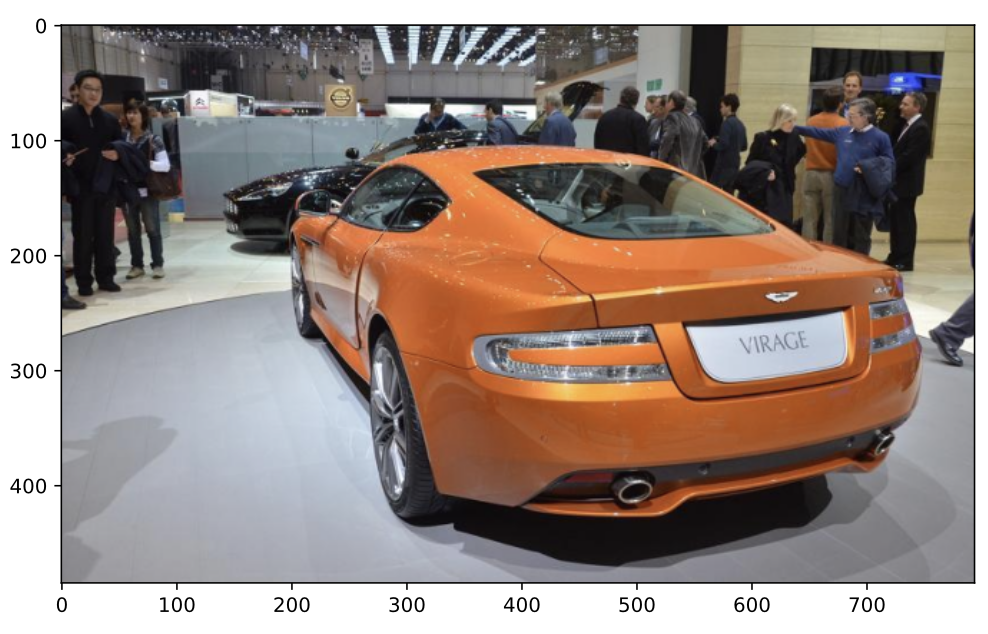
-
Complete code: this example uses deterministic resizing, tensor conversion, and normalization. These are preprocessing operations; no random augmentation is applied.
pip install datasets torch torchvision pillow matplotlibimport matplotlib.pyplot as pltfrom datasets import load_datasetfrom torchvision import transforms as T# Load the original training split, which contains image and label columns.dataset = load_dataset("tanganke/stanford_cars", split="train")# Example settings: 224 x 224 images, with pixel values scaled to [-1, 1].# Match these settings to the pretrained model when fine-tuning it.preprocess = T.Compose([T.Resize((224, 224)),T.ToTensor(), # RGB image -> float tensor in [0, 1].T.Normalize(mean=(0.5,) * 3, std=(0.5,) * 3),])def transforms(batch):# with_transform receives batches, even when one record is requested.batch["pixel_values"] = [preprocess(image.convert("RGB")) for image in batch["image"]]return batch # Preserve the labels as well.# Create a reproducible 80/20 train/test split within the HF dataset.data_splits = dataset.train_test_split(test_size=0.2, seed=42)# Attach transformations to both splits; they run when examples are read.dataset_transformed = data_splits.with_transform(transforms)# Read the first transformed training image: [channels, height, width].sample = dataset_transformed["train"][0]pixel_values = sample["pixel_values"]print("pixel_values:", tuple(pixel_values.shape), pixel_values.dtype)# Undo this example's normalization for display, then change CHW -> HWC.display_image = (pixel_values * 0.5 + 0.5).clamp(0, 1).permute(1, 2, 0)print("display:", tuple(display_image.shape))# Plot the transformed image with its class name.class_name = dataset.features["label"].int2str(sample["label"])plt.imshow(display_image)plt.title(class_name)plt.axis("off")plt.show() -
Expected output: the script displays a resized car photograph with its class name and prints the shapes below. These shapes and the normalization reversal were verified using a synthetic RGB image; the full Stanford Cars download and plotting example were not executed here.
pixel_values: (3, 224, 224) torch.float32display: (224, 224, 3) -
How the steps work:
Step Effect train_test_split(test_size=0.2, seed=42)Shuffles and assigns 80% of the loaded records to trainand 20% totest, with a repeatable splitwith_transform(transforms)Returns a dataset dictionary that applies the function when records are accessed; it does not eagerly rewrite every image ToTensor()andNormalize(...)Convert RGB pixels into channel-first floating-point tensors and apply the specified scaling pixel_values * 0.5 + 0.5Reverses the chosen normalization so Matplotlib receives RGB values in [0, 1]permute(1, 2, 0)Reorders dimensions from channels–height–width to height–width–channels for plotting The inverse normalization is for visualization only; the model receives the normalized
pixel_values. See the Hugging Face transformation API and Torchvision normalization documentation. -
Using the split during fine-tuning: the code retains the exercise's
testkey. If that 20% subset guides training decisions, it serves as a validation set; use the original test split only for final evaluation. If random crops or flips are added later, apply them to training data and keep evaluation preprocessing deterministic.
< CV fine-tuning: model classes >
-
Objective and source: adapt the pretrained
google/mobilenet_v2_1.0_224image classifier to distinguish three car classes. The checkpoint was trained on ImageNet-1k; the new task requires a classification head sized for the selected car labels. This continues the preparation example above and adapts DataCamp's CV fine-tuning: model classes exercise. -
Select the classes: start from the untransformed
data_splitscreated above. For a simple reproducible selection, keep the classes with IDs0,1, and2. Filtering removes records but retains the original 196-nameClassLabelmetadata, so update that metadata as well. These selected IDs are already consecutive; other selections must be remapped to0throughnum_labels - 1before training.pip install transformersfrom datasets import ClassLabelfrom transformers import AutoModelForImageClassification# Continue from data_splits in the dataset-preparation example.selected_ids = [0, 1, 2]original_names = data_splits["train"].features["label"].namesselected_names = [original_names[i] for i in selected_ids]dataset_three = data_splits.filter(lambda label: label in selected_ids,input_columns=["label"],)dataset_three = dataset_three.cast_column("label", ClassLabel(names=selected_names))# Obtain the new label names from the three-class dataset.labels = dataset_three["train"].features["label"].names# Use integer class IDs in the Python mappings.label2id, id2label = {}, {}for i, label in enumerate(labels):label2id[label] = iid2label[i] = labelmodel = AutoModelForImageClassification.from_pretrained("google/mobilenet_v2_1.0_224",num_labels=len(labels),id2label=id2label, # Class ID -> readable name.label2id=label2id, # Readable name -> class ID.ignore_mismatched_sizes=True, # Initialize a new classification head.)print("Number of classes:", model.config.num_labels)print("Class IDs:", sorted(model.config.id2label))print("Classifier outputs:", model.classifier.out_features) -
Expected output (model loading not executed here):
Number of classes: 3Class IDs: [0, 1, 2]Classifier outputs: 3 -
What the arguments do:
Argument Purpose in this example num_labels=len(labels)Creates an output head with three logits per image; a batch of images produces logits with shape id2labelMaps a predicted ID to a readable car-class name, such as id2label[0]label2idMaps a car-class name back to its integer ID; dataset targets must use the same IDs ignore_mismatched_sizes=TrueAllows loading despite the changed classifier dimensions; matching pretrained weights are reused and incompatible classifier weights are newly initialized The mappings describe label meanings; they do not relabel dataset records automatically. The size-mismatch flag permits the replacement head to load, but does not train it. A message about newly initialized classifier weights is expected. Fine-tune on the selected car images before evaluating predictions. See the Transformers model-loading API.
-
Connect the data to this checkpoint: use MobileNet's image processor to attach the checkpoint's preprocessing settings to the filtered dataset. This replaces the illustrative preprocessing function from the first example for subsequent model training.
from transformers import AutoImageProcessorprocessor = AutoImageProcessor.from_pretrained("google/mobilenet_v2_1.0_224")def model_transforms(batch):images = [image.convert("RGB") for image in batch["image"]]inputs = processor(images=images, return_tensors="pt")return {"pixel_values": inputs["pixel_values"], "labels": batch["label"]}dataset_transformed = dataset_three.with_transform(model_transforms)Each accessed example now supplies image tensors and a target under
labels, the model's training argument. For example, a record with class ID0retains target0; its image becomes a tensor of shape(3, 224, 224). No optimization step has run yet. See the MobileNet V2 model card.
< CV fine-tuning: trainer configuration >
-
Objective and source: configure Hugging Face
Trainerto fine-tune the three-class MobileNet model with a learning rate of6e-5, four gradient-accumulation steps, and three training epochs. This continues the preceding examples and adapts DataCamp's CV fine-tuning: trainer configuration exercise. -
Complete configuration: reuse
model,processor, and the three-classdataset_transformedfrom the previous section. The collator stacks individual image tensors into batches, andcompute_metricscalculates classification accuracy.pip install accelerateimport numpy as npimport torchfrom transformers import TrainingArguments, Trainerdef data_collator(examples):return {"pixel_values": torch.stack([x["pixel_values"] for x in examples]),"labels": torch.tensor([x["labels"] for x in examples], dtype=torch.long),}def compute_metrics(eval_pred):logits, labels = eval_predpredictions = np.argmax(logits, axis=-1)return {"accuracy": float(np.mean(predictions == labels))}training_args = TrainingArguments(output_dir="dataset_finetune",learning_rate=6e-5,gradient_accumulation_steps=4,num_train_epochs=3,per_device_train_batch_size=4,per_device_eval_batch_size=4,remove_unused_columns=False, # Keep image/label for model_transforms.eval_strategy="epoch", # Evaluate after each training epoch.save_strategy="epoch",push_to_hub=False,report_to="none", # No external experiment tracker.)trainer = Trainer(model=model,args=training_args,data_collator=data_collator,train_dataset=dataset_transformed["train"],eval_dataset=dataset_transformed["test"],processing_class=processor,compute_metrics=compute_metrics,) -
Settings that connect the examples:
Setting Effect learning_rate=6e-5Sets the initial learning rate to 0.00006gradient_accumulation_steps=4Accumulates gradients over four microbatches before an optimizer update; with batch size 4 on one device, a full accumulation group covers 16 images num_train_epochs=3Makes three passes through the training subset remove_unused_columns=FalsePreserves the raw columns needed by the lazy model_transformsfunction before it createspixel_valuesandlabelseval_dataset=dataset_transformed["test"]Uses the held-out 20% subset for evaluation; because it guides training decisions here, it serves as validation data processing_class=processorAssociates the image processor with the trainer for saving and reuse; the dataset transform already performs preprocessing The image-column setting follows the Hugging Face image-classification guide. The original Stanford Cars test split remains separate for final evaluation.
-
Concrete metric example: the following sample logits predict class IDs
[0, 1, 0]. Compared with targets[0, 1, 2], two of three predictions are correct. This checks the metric function independently of model training.sample_logits = np.array([[3.0, 1.0, 0.0],[0.0, 4.0, 1.0],[2.0, 1.0, 0.0]])sample_labels = np.array([0, 1, 2])result = compute_metrics((sample_logits, sample_labels))print(f"Accuracy: {result['accuracy']:.2%}")Verified output:
Accuracy: 66.67% -
Start training and save the result: creating the trainer only configures the workflow. Run the following to update the weights, evaluate the validation subset, and save the model and processor locally:
trainer.train()metrics = trainer.evaluate()print(metrics)trainer.save_model("dataset_finetune/final")Evaluation reports values such as
eval_lossandeval_accuracy. Their values depend on the actual training run; full fine-tuning has not been executed here. Withpush_to_hub=False, this example does not upload the model. See the Trainer API.
Related ideas
- Computer Vision (CV) introduces visual representations and common tasks.
- Fine-Tuning explains adapting pretrained models.
- Convolutional Neural Network (CNN) explains convolutional image features.
- Vision Transformer (ViT) processes images as sequences of patches.
- AI Pipelines includes an image background-removal example.
- Train, Validation, and Test Sets explains the roles of data splits.
Reference
- DataCamp: Multi-Modal Models with Hugging Face
- Hugging Face Transformers: Image classification
- Hugging Face Transformers: Trainer
- MobileNet V2 pretrained checkpoint
- Transformers: Loading pretrained models
- Google Machine Learning Crash Course: Multiclass classification
- Stanford Cars dataset on Hugging Face
- Google Machine Learning Crash Course: Dividing datasets
- Hugging Face Datasets: DatasetDict.with_transform
- Torchvision: ToTensor
- Torchvision: Normalize